STUDIOPROJECT PROPOSAL
SEPTEMBER 2026
A space for
what comes next.
Brand strategy & visual identity
The project includes a complete visual identity and a set of launch materials.
Illustrative certificate result
Free PDF editor for Windows
Merge, sign, compress, OCR a scan, fix a typo.
Free for Windows 10 and 11 — no account, no trial,
nothing to upgrade to.
Brand strategy & visual identity
The project includes a complete visual identity and a set of launch materials.
Apply the sample edit and see the session update.
Delivery is planned for October.
Preview a signature using a fictional field and certificate.
See how a document fits a sample size band.
No files uploaded or processed.
What people actually open it for
A wrong date on page two. A signature field waiting for a certificate. A 4 MB file that has to go under 300 KB. Mostly those three.
Replace a line, reflow a paragraph or fill a form field, where the words already sit.
How editing worksPick the field, pick the certificate, see it before you commit.
How signing worksCompress to a size band, OCR a scan, compare two drafts, export images.
How preparation worksEditing is a session, not a save
Text edits, form fills and signatures stay in memory until you decide. Discard, and the original on disk never changed.
Start with your original.
Edit, undo, redo or discard.
See the change in context.
Overwrite it, or write a second file.
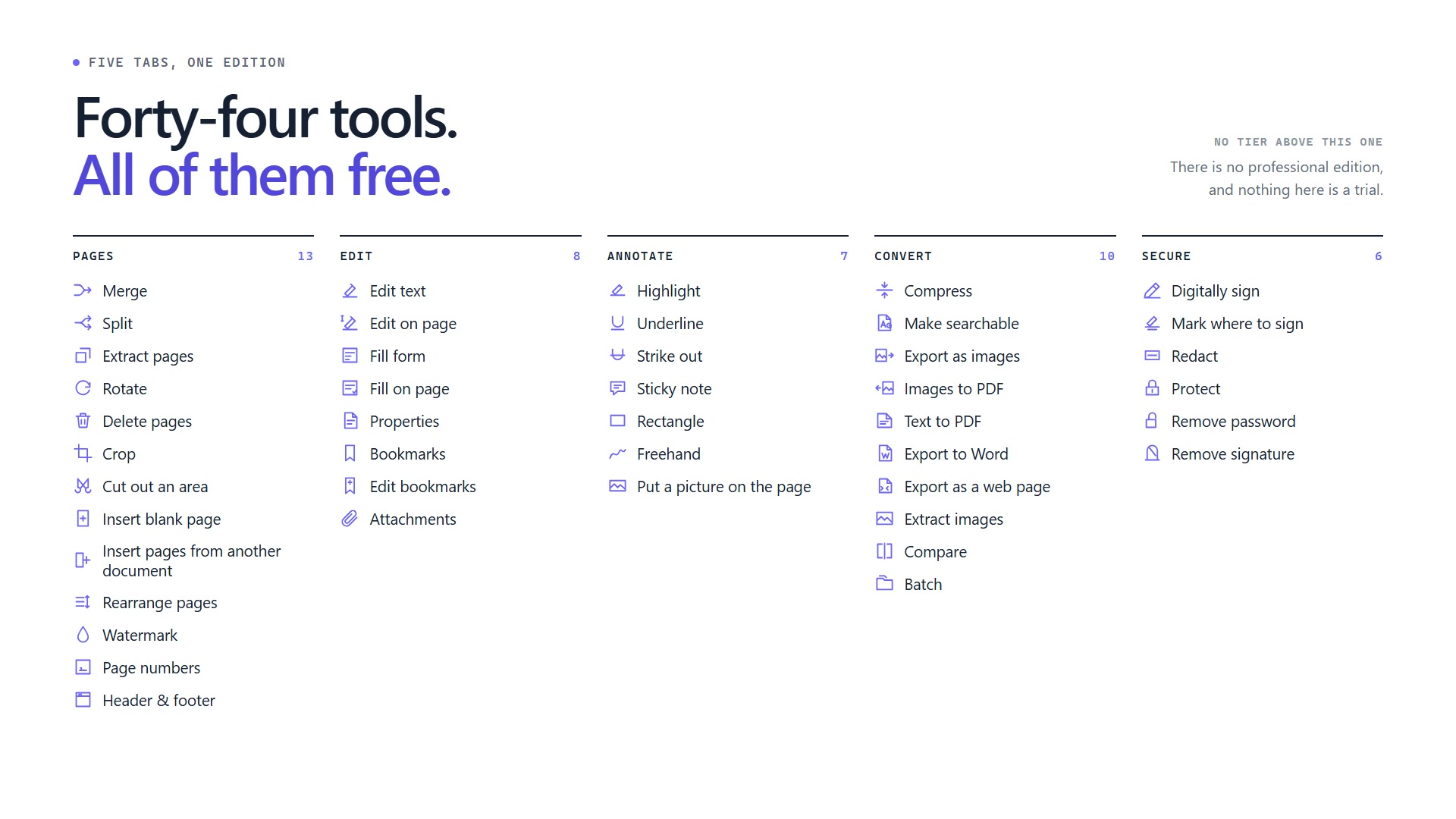
Five ribbon tabs, forty-four tools
Forty-four tools across five tabs. There is no professional edition of this application.
The open documents become one file, in the order listed.
One file per page, each rebuilt to carry only its own.
The pages you select, in page order, as a new document.
Turn the pages you selected, or all of them. Lossless.
Gone from the file, not hidden from view.
The crop box is what a reader shows you, and what falls outside it is still in the file.
Keeps the box and removes the rest of the page. Not crop: what is outside is gone, not hidden.
An empty A4 page, before whichever page you picked.
Merge joins files end to end. This puts one inside the other, at the page you name.
Say where the selection goes - front, end, or in front of a page. Works at four pages and at four hundred.
A word across every page, drawn under the content.
Six positions. Pad the digits and it is a Bates number.
Three fields along the top or the bottom, with the page number and the date filled in.
Click a line, change it, apply. Edits stay on their line.
Double-click a paragraph. It re-wraps as you type.
Values go into the PDF’s own form layer. Every reader agrees.
The same fields, drawn where they actually sit.
Title, author, subject, keywords. Empty one to clear it.
The outline the file already carries, with a click to jump anywhere in it.
Replace the outline: one flat row per heading and page.
Files carried inside the document. Add, save out, remove.
Drag across the words. Nothing is written until Apply.
For the line you want noticed, not changed.
A line through the words. The words are still there.
Type the note, then click where it belongs.
A box around the thing you are pointing at.
Ink from a mouse or a pen, laid down one stroke at a time.
A logo, a seal, or an image of your handwriting. A picture of a signature is not a signature.
Hit a size limit. Presets carry a floor as well as a ceiling.
OCR in 47 bundled languages, under the scan, on this machine.
PNG, JPEG, BMP or TIFF, at the DPI you ask for.
One page per image. PNG, JPEG, BMP, TIFF and GIF; a multi-page TIFF arrives as pages.
A .txt wrapped onto A4. Monospaced, so a table stays a table.
Words, type, bold, italic, centring, indents, lists and pictures. Two columns read in order. Tables do not survive.
One HTML file with the pictures inside it. Nothing in it reaches the network when it is opened.
JPEGs come out untouched, and anything else is rendered to PNG.
Words and pixels, boxed in a report. Not meaning.
One operation across a folder, with each file handled in its own worker.
PAdES and SHA-256, from your Windows store or a DSC token.
An empty, named field for the other side to sign into. You hand the file over; nothing is sent.
The content comes out of the file. A black box laid over the words leaves the words.
AES-256. The result is reopened and checked before it saves.
You get an unprotected copy, and the file you opened keeps its password.
Before you edit a signed file, so no reader calls it tampering.
Built with Indian paperwork in mind
It works anywhere. The awkward bits were picked from Indian filings — portal size caps, DSC tokens, scans in ${OCR_LANGUAGE_COUNT} languages.
Every language file ships inside the package, so nothing downloads the first time you run OCR - not on the first run, not ever. Fifteen Indian scripts, and the rest of the world beside them. The page image stays; a text layer goes behind it.
Give it a floor and a ceiling. If the file already fits, it says so. If it cannot get there, it says that too instead of quietly failing.
Pick an RSA certificate from Windows, including one sitting on a DSC token. Then pick the field: you sign a named field, not a whole page.
The part people ask about first
This application has no server. No account, no sync, nothing in it that sends a document anywhere. A separate cloud product is planned under the same name, and does not exist yet — if you ever use that one you are uploading on purpose, and this application is not involved.
What we do and don’t claimcreasepoint split report.pdf
--out ./pagesA separate file for each page.
The same document engine.
Ready for the next jobFor the hundredth file
Point the Batch tool at a folder, or write your own script against 51 commands. It is the same engine the window uses, so the output matches.
Practical PDF guides
Each guide names the thing that goes wrong before it explains the steps, because that is the part you came for.
A PDF stores glyphs, not paragraphs. What that means for your typo, and where the page fights back.
Read the guideWhich named field to sign, when a timestamp is worth it, and what an offline check cannot tell you.
Read the guidePortals name a floor as well as a ceiling. How to hit the band, and when to stop compressing.
Read the guideForty-seven languages, fifteen of them Indian, recognised on your machine. Why the image stays the record.
Read the guideWhat it will not do
Some jobs need a different tool, and we would rather you found that out here than after installing.
See all twelve limitationsYes, and it removes rather than covers. Highlighting and cropping hide things; a black rectangle drawn on top leaves every word underneath selectable. Redact takes the objects out of the file, then searches the saved file for the text it removed and fails if it finds any.
Not the layout, but more than the words. Paragraph breaks, type size, bold, italic, the font, centring, indents, bulleted lists and pictures all come back, and a two-column page is read down one column and then the other rather than a line from each in turn. Tables arrive as lines of text, and nothing keeps its exact position on the page.
Not yet. This is a Windows x64 package. ARM64, macOS, Linux, a portable build and Android are all unshipped.
Not yet. A signed, timestamped Windows package exists, but public download and the Microsoft Store listing are still pending.
Where the download stands
Free for personal and commercial use.
Built for Windows 10 and 11.